Nokia BL-5C battery promenade.
Tuesday, August 21, 2007

Now as it is news about the Nokia Battery problems.Let me tell you in short but informatively way the real scene behind it.
This warning/advisory applies only to the 46 million batteries manufactured by Matsushita between December 2005 and November 2006, from which there have been approximately 100 incidents of overheating reported globally. No serious injuries or property damage have been reported.So relax and check whether your battery is amongst it or not.

Now the question comes how to identify the BL-5C battery .
In order to determine if a battery is subject to this advisory, it is necessary to remove the battery from the device. A Nokia battery will have "Nokia" and "BL-5C" printed on the front of the battery. On the reverse, the Nokia mark appears at the top and the battery identification number (consisting of 26 characters) is found at the bottom. You have to simply put this battery identification number on Nokia's website.If your battery compiles to advisory you simply have to put in your Address and Nokia will delivery a battery at your doorstep.And that too free of cost.
So be safe and do the advised to get more of your mobile phone without any hassles.
Labels: tips and tweaks

posted by >> @ 8/21/2007 08:09:00 PM,
,

iPhone finally Unlocked.
Tuesday, August 07, 2007
 Finally the iPhone can be unlocked.How? Hackers in Europe have claimed to have unlocked iPhone by making use of a SIM card writer and reader and a blank SIM card and some more shit. And what they have is the iPhone making calls with full SMS capabilities on their home network.
The forum user is a pro for sure and has given a very great tutorial by which you can unlock your iPhone for sure..
This has been tested, and apparently a reader managed to unlock the phone successfully.
Well you can read it on the hackintosh Forum.
Labels: hacking, tips and tweaks
posted by >> @ 8/07/2007 08:45:00 PM,
,
Windows key use
Sunday, April 22, 2007
This is a very simple hack …..but I noticed most of my friends didnt know about ALL the uses of the key….so ..here are some i know …:)
1) Windows Key + E : Opens windows explorer…probably the most common windows key shortcuts ….widely used
2) Windows key + D : Takes you to your DESKTOP.
3) Windows key + F : Displays the Find Dialog Box
4) Windows key + M : Minimizes all open windows …[almost as win + D]
5) Windows key+Shift + M : Restores all the minimized windows back to where you were
6) Windows key + L : Locks your windows …takes you back to your startup screen in XP
7) Windows Key + R : Displays the run command dialog box
8) Windows Key +Pause/Break : Displays the Systems Properties dialog box.
9) Windows Key + F1 : Displays the help menu in windows
10) Windows Key + Tab : Cycle through the buttons on the Task Bar.
Source:JustGoldd BlogLabels: tips and tweaks
posted by >> @ 4/22/2007 05:19:00 PM,
,
BSOD through the last few ages.
Tuesday, February 06, 2007
Windows has gone through many changes over the years, but one feature has remained comfortingly consistent: the Blue Screen of Death. Otherwise known as a system freeze, the BSOD is well known to Windows users the world over. Have a look at these more unlikely BSOD sightings.
 A common sight to anyone who used Windows 95, Windows 98 or Windows ME regularly. The BSOD would pop up whenever a floppy disk was removed too soon, or a keyboard was unplugged at the wrong time, or when RAM chips started to fail.
 Thevery first Blue Screen of Death wasn't actually a "stop error." It occurred in Windows 1.1, and only when the system crashed during the boot process.
 This phenomenon crosses linguistic lines: the Germans have their own BSOD
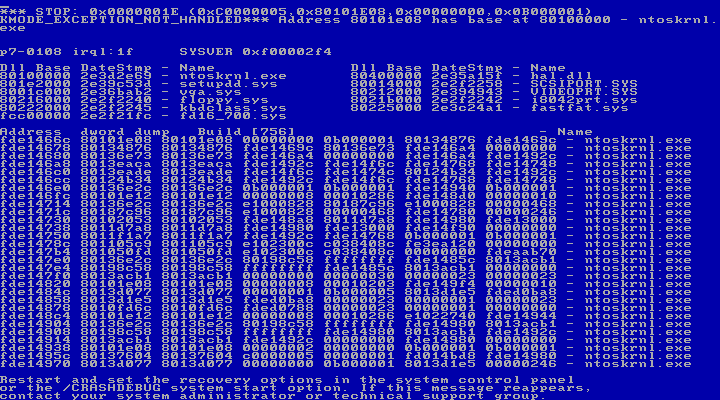 Certain versions of Windows could be programmed to write debugging information whenever spitting out a BSOD..
 Here come the latest,
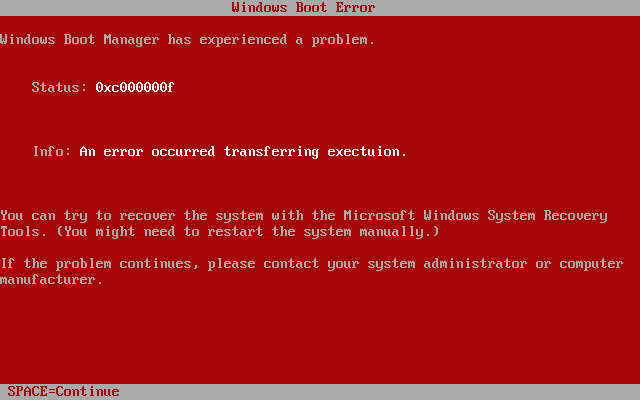 Early beta versions of Windows Vista (dubbed "Longhorn") displayed a Red Screen of Death when boot errors were encountered. The red screen was a rare treat for Longhorn testers -- all other crashes in the OS brought up the familiar blue screen. The final version of Vista preserves the BSOD legacy for the next generation..
 Apple's answer to the BSOD is the Kernel Panic error that results when Mac OS X encounters a fatal software or hardware error. Kernel Panic errors are seen on all Unix-based operating systems.

Labels: tips and tweaks
posted by >> @ 2/06/2007 09:47:00 PM,
,
Increase your Internet Connection Speed.
Friday, February 02, 2007
A DNS server translates a human address like google.com into a numerical IP address so your computer can take you to the right site. Usually, this takes a few hundred milliseconds to complete so it's barely noticeable, but over time, these milliseconds can really build up. By using OpenDNS and FastCache, you can speed up your internet connection.
OpenDNS runs a distributed network of DNS servers so using it is more reliable. It filters out bad addresses so phishers and spammers can't direct you to their site. OpenDNS also detects typos in the URLs you enter so entering craigslist.og leads you to craigslist.org. A piece of software called FastCache takes care of the problem of speed. It stores the IP address that is returned by your DNS server so your computer doesn't have to request it every time you want to go to a particular site, saving a few hundred milliseconds each time.
To set it up:
1. Once you install and start FastCache, you configure your computer to use it by Start->Control Panel->Network Connections.
2. Right click on the connection you're using and go to Properties.
3. Select Internet Protocol (TCP/IP) and click Properties.
4. Choose "Use the Following DNS server addresses" enter 127.0.0.1 as the primary.
5. Click OK and restart your computer.
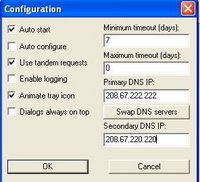
6. To configure FastCache to use OpenDNS's servers, enter these IP addresses into it:
- 208.67.222.222

- 208.67.220.220
Labels: tips and tweaks
posted by >> @ 2/02/2007 06:02:00 PM,
,
Some XP surprises.

Got bored of your old Windows XP(can't shell some extra money for the Vista) still want something new on XP.Then here are some XP easter eggs (easter eggs are the hidden features).
To win a game of Solitaire just start a new game and press "Alt+Shift+2".And hurray you have won the game.
In Freecell you have to just press "Ctrl+Shift+F10".Then a dialog box will appear with options Abort or Retry or Ignore.Just press Abort.
In Pinball there are two hacks,one is to get an extra ball.Just type "1max" at the start of the game.Second one is to get the top rank,just type "rmax" and you beat all of the top scorers.
Now this hack is quite a serious one.Windows XP has a secret Font editor wherein you can edit the fonts and have them as you like.Just follows the following steps.
Start>Run>Run eudcedit.
Now this will start a program name "The Private Character Editor"
Know all the use of the "Windows Key"Visit this post.
Labels: tips and tweaks
posted by >> @ 2/02/2007 03:41:00 PM,
,

Blog


About This Blog
This is a Tech Blog.Get all the updates in the world of internet and latest in technology on this blog. As the name goes No Ctrl C ,this blog has all the original articles posted so, no copying and pasting work from your side.